Bot Setup Guide
Follow these simple steps to deploy your high-frequency arbitrage bot on the Sui Network.
★How the Strategy Works
The bot executes a Flashloan Arbitrage loop within a single atomic transaction block. This means the entire operation either succeeds with profit or reverts (cancels) instantly, costing you nothing but a tiny gas fee.
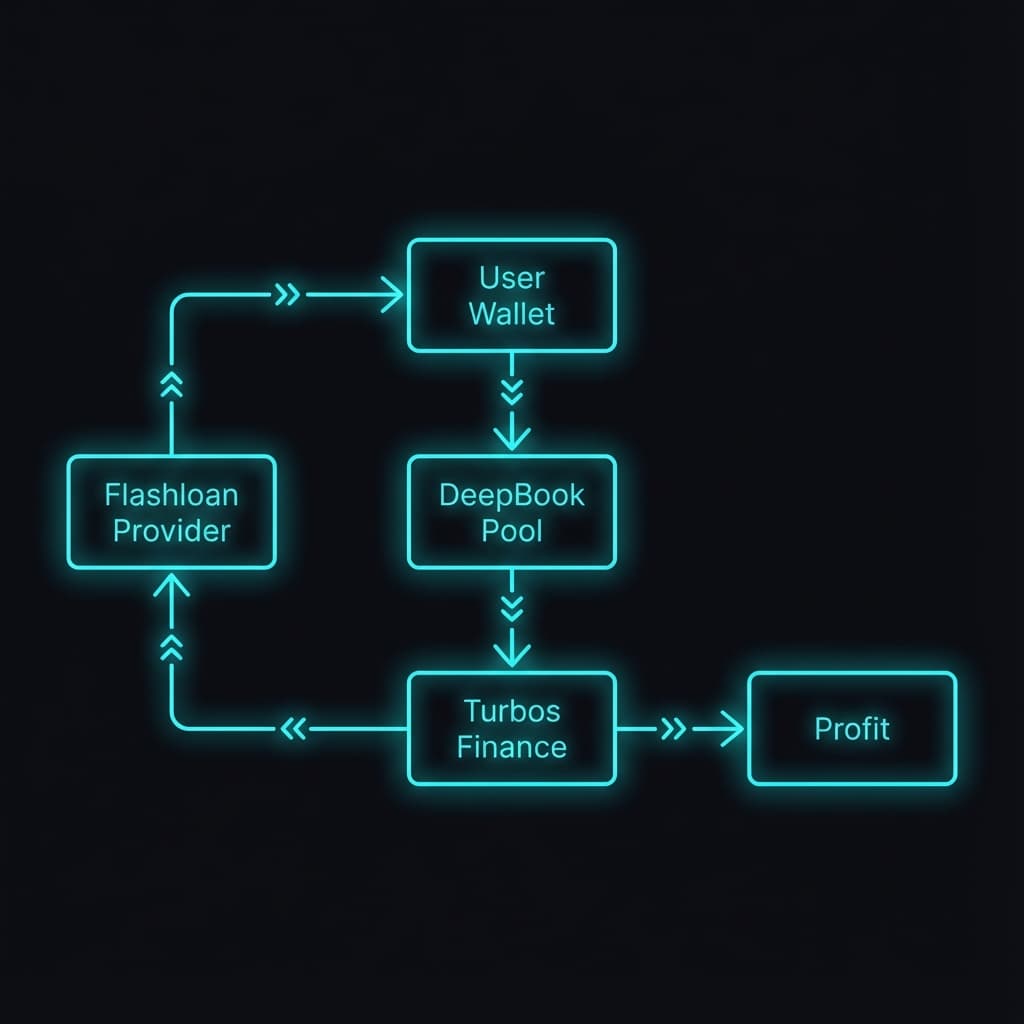
Step 1: Flashloan
Borrow 2,400 USDC from DeepBook's liquidity pool without collateral.
Step 2: DeepBook Trade
Use the borrowed USDC to buy SUI on DeepBook (Limit Order Book) at a lower price.
Step 3: Turbos Trade
Sell that SUI on Turbos Finance (AMM) where the price is slightly higher.
Step 4: Repay & Profit
Repay the 2,400 USDC loan + small fee. Currently, you keep the remaining profit in your wallet.
1Prerequisites
Before starting, ensure you have the following installed:
- Node.js (v18+): Download Here
- Text Editor: VS Code is recommended.
- Sui Wallet: You need a wallet with a small amount of SUI (~1 SUI) for gas fees.
2Installation
Unzip the downloaded file and open your terminal in that directory.
npm install
3Configuration
Rename env.example to .env and add your private key.
# Wallet Configuration (REQUIRED)
PRIVATE_KEY=suiprivkey...

# Network (Optional, defaults to Suiscan)
SUI_RPC_URL=https://rpc-mainnet.suiscan.xyz:443

# Bot Settings
FLASHLOAN_AMOUNT=2397000000  # 2397 USDC
GAS_BUDGET=300000000         # 0.3 SUI
4Start the Bot
Run the bot in development mode to verify everything works.
npm run dev
For long-term operation, compile and run in production mode:
npm run build && npm start